We have added four tools to the site over the past few months. They are free, none of them ask you to make an account, and all of them run entirely in your browser. The file you load never gets uploaded anywhere, which matters more than it sounds like it should when the file is a record from a client substation.
The reason they exist is not complicated. A lot of the work we do starts with opening a file that normally requires software licensed per seat and installed on a Windows laptop somebody else owns. We got tired of that.
OTDR .SOR Reader
This reads Telcordia SR-4731 trace files, which is the format every OTDR writes. You get the backscatter curve, the acquisition settings, and the instrument's own event table.
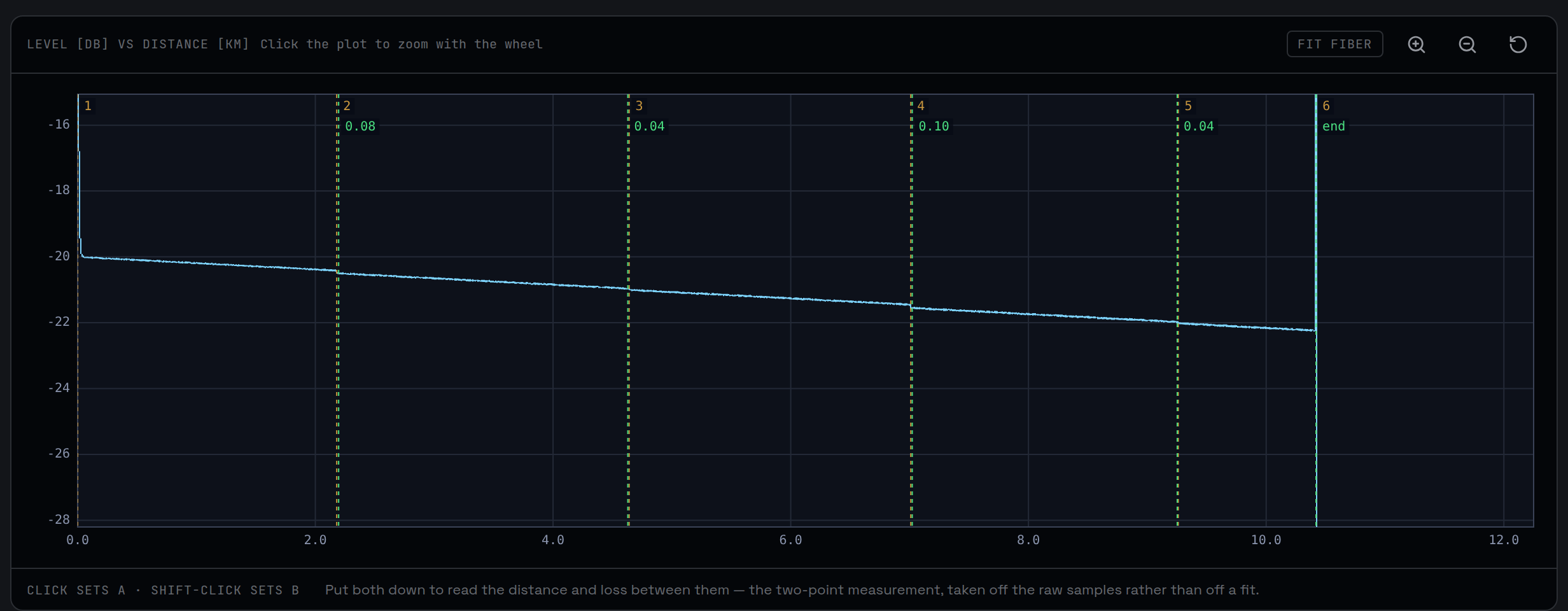
It also does something the vendor software generally does not, which is measure the trace again from scratch. The tool runs a least-squares fit across the samples and works out its own figures for every splice, connector and section attenuation. Then it puts both sets of numbers side by side and leaves them there. We never merge them, because the place where an instrument's automatic event finder and a second pass over the same samples disagree is usually the most informative thing on the screen.
Load the same span shot from the far end and it will pair the two traces and average them. This is worth doing. A splice that reads as a gain is the thing that confuses people most, and no, nothing is producing light. Two fibers with slightly different backscatter coefficients spliced together read high from one end and low from the other by exactly the same amount. One direction is half a measurement. The average of the two is the real loss, and the half-difference tells you about the glass rather than about the splice.
If the two traces disagree about the length of the span by more than a couple hundred metres, the tool refuses to average them and says so. They are probably not the same fiber.
TCC Curve Plotter
Time-current curves for overcurrent relays, fuses and low-voltage breakers, all on one log-log plot. Relay curves follow the IEEE C37.112 and IEC 60255 families with optional instantaneous elements. Fuses are fitted from two points off the manufacturer's own sheet. Breakers get long-time, short-time and instantaneous bands.
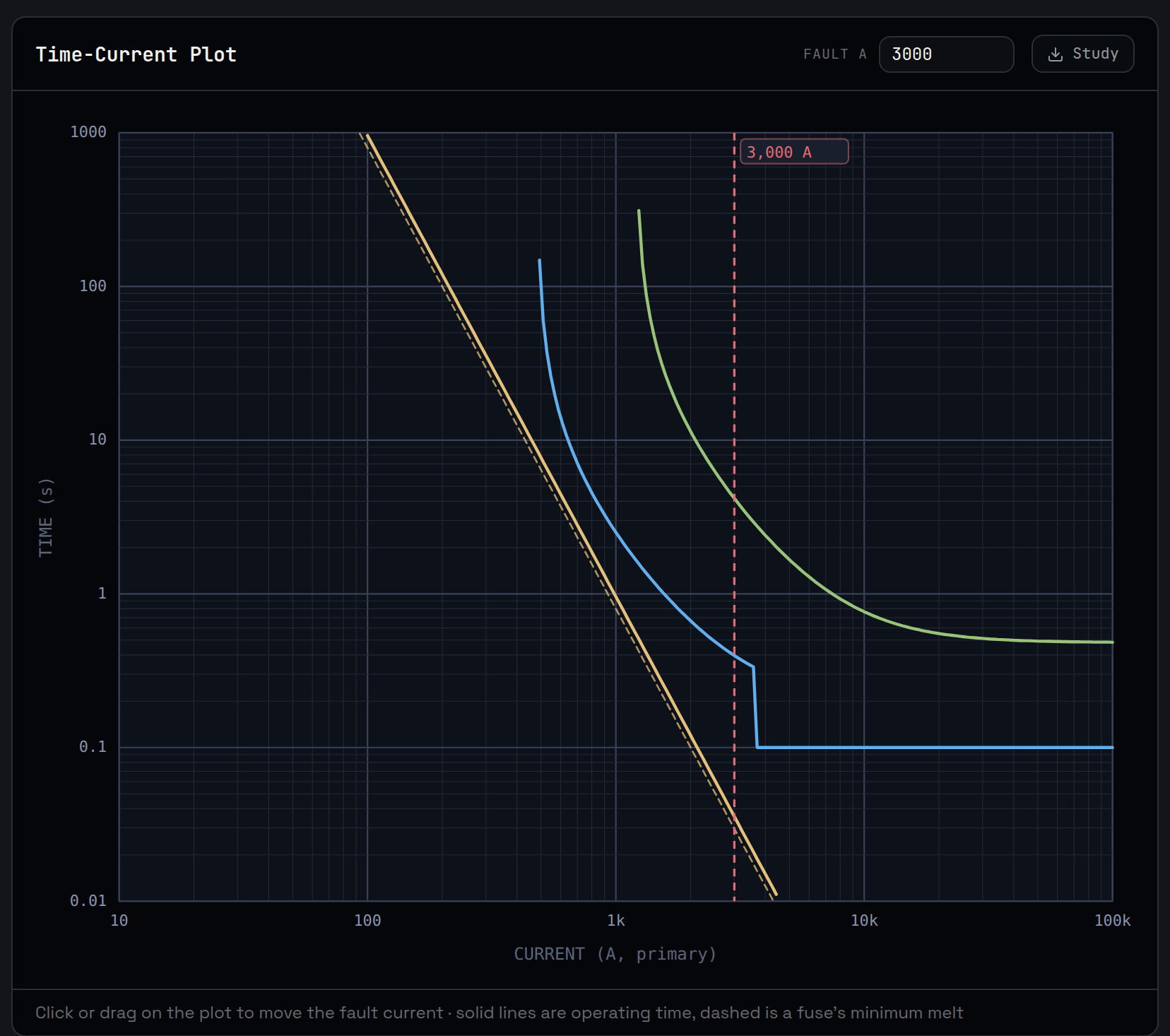
You can drag a fault current across the plot and watch the order of operation change as you move it. The piece that took longest to get right is the coordination check, which hunts for the worst margin anywhere across the current range rather than at the one value you happened to type in. That includes finding the crossovers, where the upstream device starts operating first and the coordination you thought you had quietly stops existing above some current.
Sequence of Events Merger
Load SER reports and event logs from several relays, an RTAC, whatever else wrote a log, and it puts them all on one timeline. The parser looks for a time, a point name and a state rather than for a particular vendor's layout, so an SEL-451 table, an older 351S one and an RTAC CSV all read without anybody special-casing them.
The real problem here is clocks. If two devices disagree about what time it is, merging their logs gives you a sequence that looks authoritative and is wrong. A breaker opens before the trip that caused it. The main relay picks up before the feeder saw the fault. So the tool lets you pin two events you know happened at the same instant, which turns each device's clock error from an assumption into a measurement.
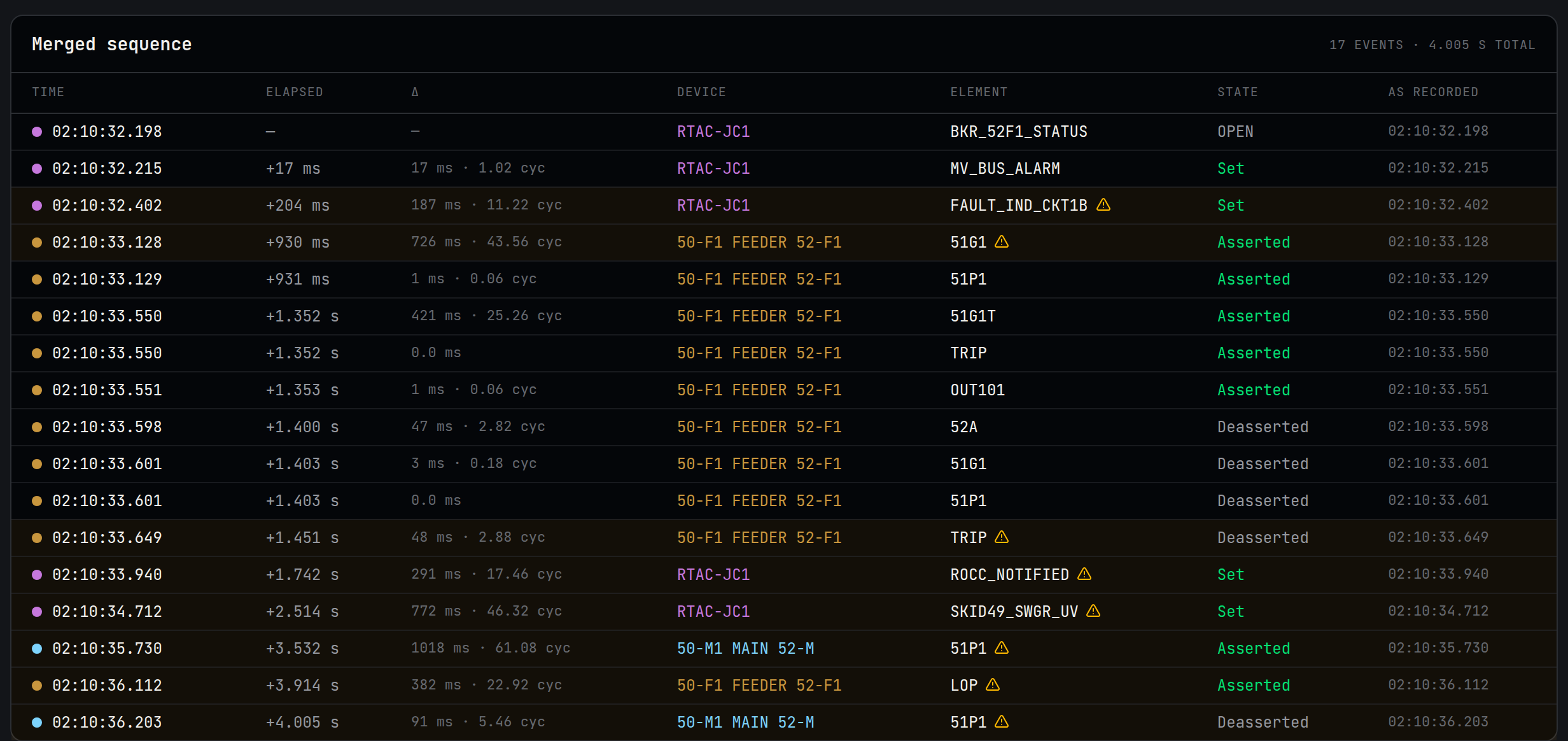
Where two devices still sit closer together than their combined clock uncertainty, the tool marks the order as not established. It shows you what the timestamps say and tells you plainly that this is not evidence, because any other ordering of those entries fits the logs equally well. We think that is more useful than a clean sequence the data cannot actually support.
Email Deliverability Checker
This one sits further from our usual work, but it comes up with clients constantly. It checks a domain's SPF, DMARC, DKIM and MX records and explains what each of them is doing.
The part most checkers skip is the SPF lookup limit. SPF allows ten DNS lookups per check, includes nest inside other includes, and adding one provider too many silently breaks authentication for every message you send while the record still looks perfectly reasonable sitting in your DNS panel. Ours walks the whole include chain, counts the lookups the way a receiving server would, and names the exact term that tips it over the limit.
It measures the DKIM key too, rather than taking anyone's word for it. A 1024-bit key and a 2048-bit key look identical in every control panel that displays a DKIM record. The only difference is the length of a base64 blob nobody reads.
One honest caveat about this tool. DKIM selectors cannot be listed. There is no record anywhere that enumerates them, so the only way to check a selector is to already know its name. We try around forty used by common providers and report exactly that, rather than concluding anything from silence. That list grew by one after the checker told us a domain of our own had no DKIM. It had DKIM. We had simply never added resend to the list of names worth trying.
Where these came from
None of them started out as products. Each one started as something we needed on a job, and putting them on the site was mostly a case of there being no good reason not to. If one of them saves you an afternoon, that is the whole point. If you find a file that breaks one, we would genuinely like to hear about it, because parsers only improve by meeting files we did not write ourselves.